
Track Your Clients' Estate Plan Progress: Execution Details & Estate Tax Reports
Track your clients' estate plan execution, access estate tax reports, and stay ahead of every update—all in one place with Trust & Will's Advisor Platform.

By Jenna Komsa
Marketing Manager, Trust & Will
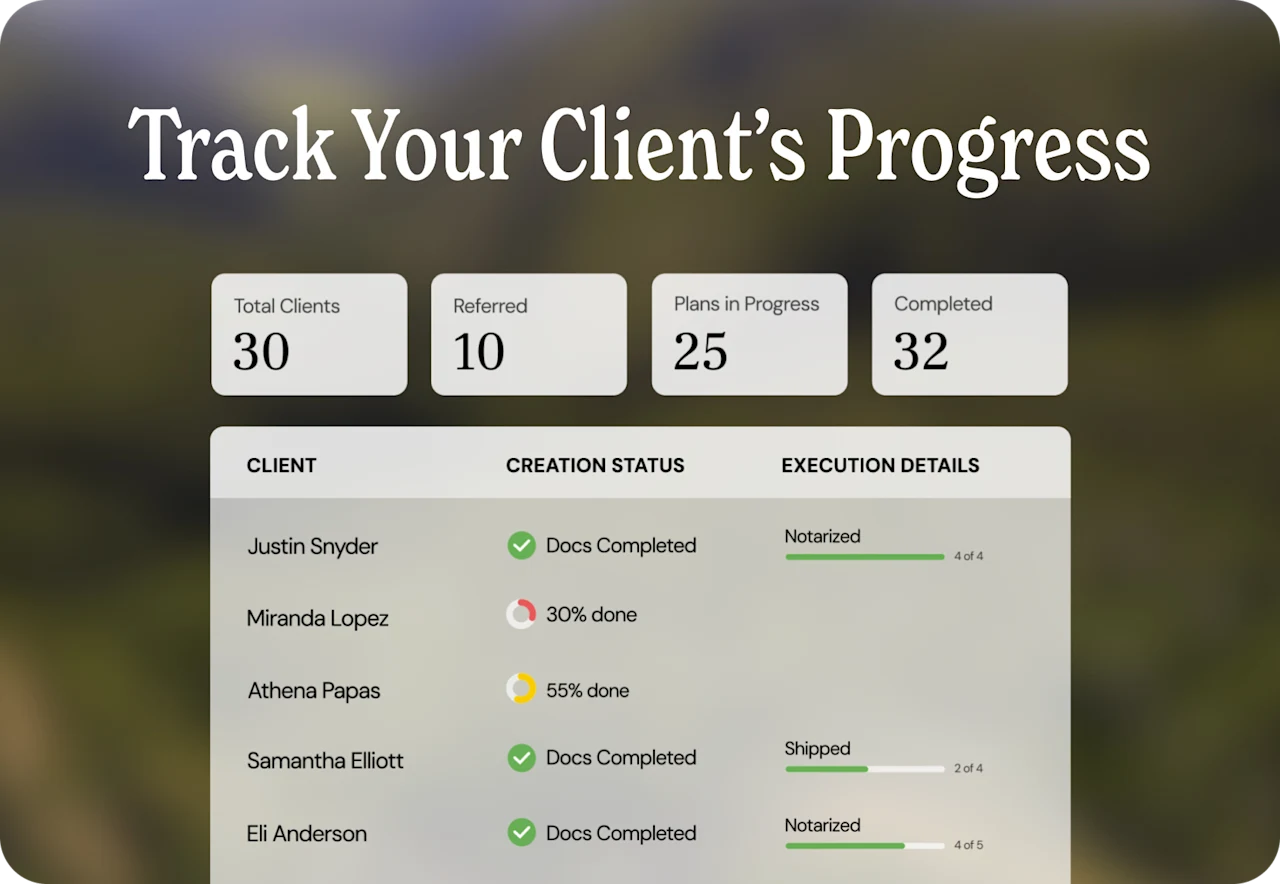
Your Advisor Portal now provides end-to-end visibility into your clients’ estate plans. In addition to tracking document creation, you can now monitor execution milestones like notarization, trust funding, and deed transfers, plus access a full estate tax report for each client.
What’s Changed on Your Dashboard
The Status column has been renamed to Creation Status and still shows the percentage of estate plan sections completed, now with an updated visual style and a tooltip that clarifies when the information was last updated. At 100%, it displays “Docs Completed.” A new Execution Details column appears next to it, showing a step-by-step tracker for post-creation milestones. Will plans show four steps; Trust plans show five (the additional step is trust funding). Both columns are sortable.
What’s New on Client Detail Pages
When you click into a client, you’ll see new overview tiles at the top of the page. Will clients display two tiles covering creation status and execution details. Trust clients display four tiles that add asset re-titling progress and real property deed transfer status. Each tile includes tooltips explaining the data and calculations. You’ll also see estate tax report highlights (federal and state quick hits) and shipping details when applicable.
The Estate Tax Report Tab
A new tab on each client’s detail page shows the full estate tax report. This is the same report your client sees on the consumer side of Trust & Will, with minor language adjustments for advisor context. This means you can get on a call with your client and reference the same report without any discrepancies.
How the Data Works
All execution data is self-reported by clients through their Trust & Will member account. When a client notarizes their documents, updates asset ownership, or transfers a deed, they report it through the platform and you see the update in your portal. Trust funding calculations exclude personal property (items like jewelry, instruments, and other belongings that don’t require formal re-titling) from the denominator to give you an accurate picture of formal re-titling progress.
Tips for Getting the Most from These Features
Sort the Execution Details column to quickly find clients who may be stuck at a specific step.
Use the estate tax report highlights on the overview for quick prep before calls.
Open the full Estate Tax Report tab when you’re on a call with a client so you’re both looking at the same information.
For trust clients, check the real property deed transfer tile to see if all properties have been transferred to the trust.
Interested in partnering with Trust & Will to enhance your own clients’ estate planning needs? Learn more about how you can join over 20,000 financial advisors and firms who are delivering peace of mind to their clients by offering a comprehensive estate planning solution. Create your free advisor account and explore the full suite of advisor tools.
Existing Trust & Will advisors: Log in to your Advisor Portal and try it today.
Trust & Will is an online service providing legal forms and information. We are not a law firm and we do not provide legal advice.
Last updated: July 29, 2026


Related Articles
View All Articles
Financial Advisors - 3 min read
Seven Days, Seven Advisors: Reviewing Estate Plans During Estate Planning Awareness Week

Financial Advisors - 4 min read
How Advisors Help Families Name Their Quarterback Before a Crisis Does

Financial Advisors - 5 min read